
Examinations & results
Manage assessments and results with a clear review process.
Keep assessment records organised from marks entry to results publication. Help lecturers submit results and give authorised staff a clear process for reviewing and approving them.
Calculated for you
Weights, totals and grades are worked out from the marks entered.
Reviewed before release
Results are moderated and approved before students can see them.
Transcripts from approved results
Official transcripts are generated from the published results.
Examinations & results
Assessment setup
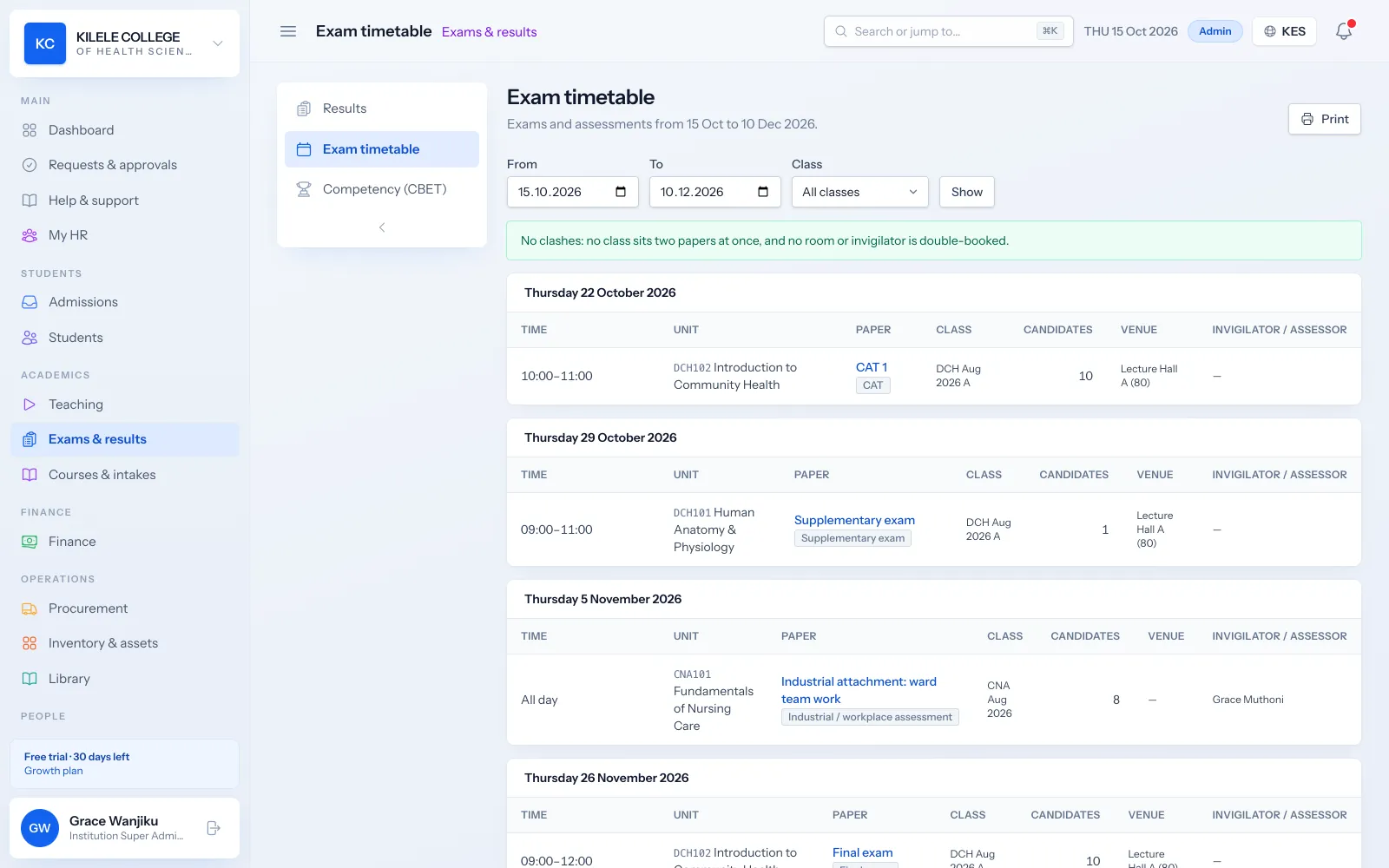
Set up each unit's assessments with a type, weight and maximum score. The exam timetable schedules CATs and exams with rooms.
- Types: CAT, mid-term, final exam, assignment, practical and oral
- Weight and maximum score per assessment
- Practical assessments with checklists and criteria
- Exam timetable with dates and rooms
Examinations & results
Marks entry
Lecturers enter marks per assessment for their class, or marks come in automatically from online quizzes and exams.
- Marks entry per class and assessment
- Automatic marks from online quizzes and exams
- Validation against each assessment's maximum score
Examinations & results
Grading rules
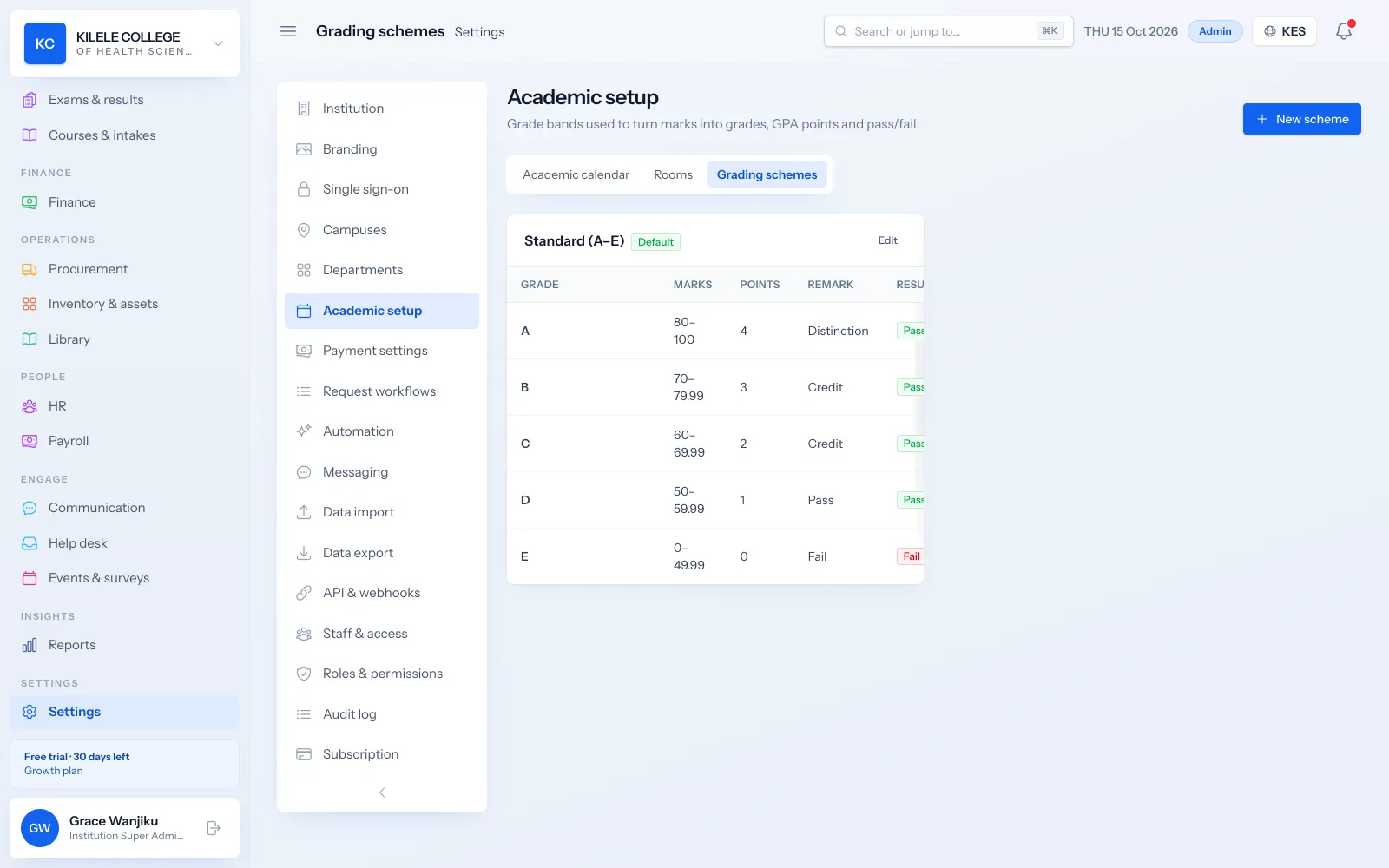
Define grading schemes with your own grade bands, points and pass marks, and use different schemes for different programmes.
- Grade bands with points and pass marks
- Different schemes per course or level
- Competent / Not Yet Competent for competency-based units
Examinations & results
Results review
Examination officers review marks and record moderation adjustments with reasons before approving results.
- Moderation adjustments with reasons
- Approval before publication
- Every change kept in the audit log
Examinations & results
Results publication
Approved results are published per class and unit and appear in the student portal. Students who fail or miss exams are listed for supplementary, resit or special sittings.
- Publish results to students per class unit
- Supplementary, resit and special exam candidates and sittings
- Optional automatic messages when results are published
Examinations & results
Academic reports
Report on results across classes and units, and give students their transcripts.
- Results summary report with pass rates and mean marks per unit
- Transcripts as PDFs
- Students download transcripts from the portal
How it works
Examinations & results, step by step
-
1
Set up
Lecturers set assessments with weights for each unit.
-
2
Enter marks
Marks are entered or come from online quizzes and exams.
-
3
Review
Marks are moderated and results approved.
-
4
Publish
Students see results in the portal; transcripts are ready.
Who uses it
Built for everyone involved
Lecturers
Set up assessments and enter marks.
Examination officers
Moderate, approve and publish results and run resits.
Registrars
Issue transcripts.
Students
View published results and download transcripts.
FAQ
Questions about Examinations & results
Which grading structures are supported?
Grading schemes you define with grade bands, points and pass marks, assigned per course or level, plus Competent / Not Yet Competent for competency-based units.
How are marks corrected?
Before approval, lecturers update the marks they entered. During review, moderators record adjustments with a reason. All changes are kept in the audit log.
Who approves published results?
Staff whose role includes approving results, typically examination officers. Results only appear to students once they are approved and published.
Are transcripts and result slips available?
Transcripts are generated as PDFs from published results, and students download them in the portal, where their published results are also shown per unit. A separate result slip document is not produced.
Works together with
Related features
Attendance management
Class registers, QR check-in, absence history and attendance reports.
Learn moreCompetency-based training (CBET)
Units of competency, outcomes, evidence, assessors and C/NYC results.
Learn moreCertificates & verification
Templates, completion requirements, QR verification, revocation and reissue.
Learn moreSee how Soma360 fits your institution
Tell us how your institution works and we will focus the demo on your records, departments and workflows. Prefer to explore alone? Start a 30-day free trial.